Instructions to use TobDeBer/Laguna-S-2.1-GGUF with libraries, inference providers, notebooks, and local apps. Follow these links to get started.
- Libraries
- Transformers
How to use TobDeBer/Laguna-S-2.1-GGUF with Transformers:
# Use a pipeline as a high-level helper from transformers import pipeline pipe = pipeline("text-generation", model="TobDeBer/Laguna-S-2.1-GGUF") messages = [ {"role": "user", "content": "Who are you?"}, ] pipe(messages)# Load model directly from transformers import AutoModel model = AutoModel.from_pretrained("TobDeBer/Laguna-S-2.1-GGUF", device_map="auto") - Notebooks
- Google Colab
- Kaggle
- Local Apps Settings
- llama.cpp
How to use TobDeBer/Laguna-S-2.1-GGUF with llama.cpp:
Install (macOS, Linux)
curl -LsSf https://llama.app/install.sh | sh # Start a local OpenAI-compatible server with a web UI: llama serve -hf TobDeBer/Laguna-S-2.1-GGUF:UD-IQ2_XXS_REAP # Run inference directly in the terminal: llama cli -hf TobDeBer/Laguna-S-2.1-GGUF:UD-IQ2_XXS_REAP
Install from WinGet (Windows)
winget install llama.cpp # Start a local OpenAI-compatible server with a web UI: llama serve -hf TobDeBer/Laguna-S-2.1-GGUF:UD-IQ2_XXS_REAP # Run inference directly in the terminal: llama cli -hf TobDeBer/Laguna-S-2.1-GGUF:UD-IQ2_XXS_REAP
Use pre-built binary
# Download pre-built binary from: # https://github.com/ggerganov/llama.cpp/releases # Start a local OpenAI-compatible server with a web UI: ./llama-server -hf TobDeBer/Laguna-S-2.1-GGUF:UD-IQ2_XXS_REAP # Run inference directly in the terminal: ./llama-cli -hf TobDeBer/Laguna-S-2.1-GGUF:UD-IQ2_XXS_REAP
Build from source code
git clone https://github.com/ggerganov/llama.cpp.git cd llama.cpp cmake -B build cmake --build build -j --target llama-server llama-cli # Start a local OpenAI-compatible server with a web UI: ./build/bin/llama-server -hf TobDeBer/Laguna-S-2.1-GGUF:UD-IQ2_XXS_REAP # Run inference directly in the terminal: ./build/bin/llama-cli -hf TobDeBer/Laguna-S-2.1-GGUF:UD-IQ2_XXS_REAP
Use Docker
docker model run hf.co/TobDeBer/Laguna-S-2.1-GGUF:UD-IQ2_XXS_REAP
- LM Studio
- Jan
- vLLM
How to use TobDeBer/Laguna-S-2.1-GGUF with vLLM:
Install from pip and serve model
# Install vLLM from pip: pip install vllm # Start the vLLM server: vllm serve "TobDeBer/Laguna-S-2.1-GGUF" # Call the server using curl (OpenAI-compatible API): curl -X POST "http://localhost:8000/v1/chat/completions" \ -H "Content-Type: application/json" \ --data '{ "model": "TobDeBer/Laguna-S-2.1-GGUF", "messages": [ { "role": "user", "content": "What is the capital of France?" } ] }'Use Docker
docker model run hf.co/TobDeBer/Laguna-S-2.1-GGUF:UD-IQ2_XXS_REAP
- SGLang
How to use TobDeBer/Laguna-S-2.1-GGUF with SGLang:
Install from pip and serve model
# Install SGLang from pip: pip install sglang # Start the SGLang server: python3 -m sglang.launch_server \ --model-path "TobDeBer/Laguna-S-2.1-GGUF" \ --host 0.0.0.0 \ --port 30000 # Call the server using curl (OpenAI-compatible API): curl -X POST "http://localhost:30000/v1/chat/completions" \ -H "Content-Type: application/json" \ --data '{ "model": "TobDeBer/Laguna-S-2.1-GGUF", "messages": [ { "role": "user", "content": "What is the capital of France?" } ] }'Use Docker images
docker run --gpus all \ --shm-size 32g \ -p 30000:30000 \ -v ~/.cache/huggingface:/root/.cache/huggingface \ --env "HF_TOKEN=<secret>" \ --ipc=host \ lmsysorg/sglang:latest \ python3 -m sglang.launch_server \ --model-path "TobDeBer/Laguna-S-2.1-GGUF" \ --host 0.0.0.0 \ --port 30000 # Call the server using curl (OpenAI-compatible API): curl -X POST "http://localhost:30000/v1/chat/completions" \ -H "Content-Type: application/json" \ --data '{ "model": "TobDeBer/Laguna-S-2.1-GGUF", "messages": [ { "role": "user", "content": "What is the capital of France?" } ] }' - Ollama
How to use TobDeBer/Laguna-S-2.1-GGUF with Ollama:
ollama run hf.co/TobDeBer/Laguna-S-2.1-GGUF:UD-IQ2_XXS_REAP
- Unsloth Studio
How to use TobDeBer/Laguna-S-2.1-GGUF with Unsloth Studio:
Install Unsloth Studio (macOS, Linux, WSL)
curl -fsSL https://unsloth.ai/install.sh | sh # Run unsloth studio unsloth studio -H 0.0.0.0 -p 8888 # Then open http://localhost:8888 in your browser # Search for TobDeBer/Laguna-S-2.1-GGUF to start chatting
Install Unsloth Studio (Windows)
irm https://unsloth.ai/install.ps1 | iex # Run unsloth studio unsloth studio -H 0.0.0.0 -p 8888 # Then open http://localhost:8888 in your browser # Search for TobDeBer/Laguna-S-2.1-GGUF to start chatting
Using HuggingFace Spaces for Unsloth
# No setup required # Open https://huggingface.co/spaces/unsloth/studio in your browser # Search for TobDeBer/Laguna-S-2.1-GGUF to start chatting
- Pi
How to use TobDeBer/Laguna-S-2.1-GGUF with Pi:
Start the llama.cpp server
# Install llama.cpp: brew install llama.cpp # Start a local OpenAI-compatible server: llama serve -hf TobDeBer/Laguna-S-2.1-GGUF:UD-IQ2_XXS_REAP
Configure the model in Pi
# Install Pi: npm install -g @mariozechner/pi-coding-agent # Add to ~/.pi/agent/models.json: { "providers": { "llama-cpp": { "baseUrl": "http://localhost:8080/v1", "api": "openai-completions", "apiKey": "none", "models": [ { "id": "TobDeBer/Laguna-S-2.1-GGUF:UD-IQ2_XXS_REAP" } ] } } }Run Pi
# Start Pi in your project directory: pi
- Docker Model Runner
How to use TobDeBer/Laguna-S-2.1-GGUF with Docker Model Runner:
docker model run hf.co/TobDeBer/Laguna-S-2.1-GGUF:UD-IQ2_XXS_REAP
- Lemonade
How to use TobDeBer/Laguna-S-2.1-GGUF with Lemonade:
Pull the model
# Download Lemonade from https://lemonade-server.ai/ lemonade pull TobDeBer/Laguna-S-2.1-GGUF:UD-IQ2_XXS_REAP
Run and chat with the model
lemonade run user.Laguna-S-2.1-GGUF-UD-IQ2_XXS_REAP
List all available models
lemonade list
- Hermes Agent
How to use TobDeBer/Laguna-S-2.1-GGUF with Hermes Agent:
Start the llama.cpp server
# Install llama.cpp: brew install llama.cpp # Start a local OpenAI-compatible server: llama serve -hf TobDeBer/Laguna-S-2.1-GGUF:UD-IQ2_XXS_REAP
Configure Hermes
# Install Hermes: curl -fsSL https://hermes-agent.nousresearch.com/install.sh | bash hermes setup # Point Hermes at the local server: hermes config set model.provider custom hermes config set model.base_url http://127.0.0.1:8080/v1 hermes config set model.default TobDeBer/Laguna-S-2.1-GGUF:UD-IQ2_XXS_REAP
Run Hermes
hermes
- Atomic Chat
- OpenClaw
How to use TobDeBer/Laguna-S-2.1-GGUF with OpenClaw:
Start the llama.cpp server
# Install llama.cpp: brew install llama.cpp # Start a local OpenAI-compatible server: llama serve -hf TobDeBer/Laguna-S-2.1-GGUF:UD-IQ2_XXS_REAP
Configure OpenClaw
# Install OpenClaw: npm install -g openclaw@latest # Register the local server and set it as the default model: openclaw onboard --non-interactive --mode local \ --auth-choice custom-api-key \ --custom-base-url http://127.0.0.1:8080/v1 \ --custom-model-id "TobDeBer/Laguna-S-2.1-GGUF:UD-IQ2_XXS_REAP" \ --custom-provider-id llama-cpp \ --custom-compatibility openai \ --custom-text-input \ --accept-risk \ --skip-health
Run OpenClaw
openclaw agent --local --agent main --message "Hello from Hugging Face"
Model details
This model is a hard requant of Laguna-S-2.1-UD-IQ3_XXS.gguf.
A Big Thank You goes out to the unsloth team for providing that!
To run it you need a llama.cpp build of 2026-07-23 or later!
... but why?!?!
This is a hard compression of a 118b model to below 20GB.
This means it destroys a lot of the capabilities of the original model!
So why the heck did I do this? As an experiment if such a huge model compressed hard is still better than a more right-sized model at the 24GB GPU tier.
Let's see how it turns out. Please add your results in the comments section.
Running with llama.cpp
The GGUFs in this repo are hard requants based on Unsloth Dynamic 2.0 quants (imatrix calibrated).
Download the UD-IQ3_XXS_Q1exps (~19GB):
huggingface-cli download TobDeBer/Laguna-S-2.1-GGUF \
--include "Laguna-S-2.1-UD-IQ3_XXS_Q1exps.gguf" \
--local-dir Laguna-S-2.1-GGUF
Serve it with llama-server:
./llama.cpp/build/bin/llama-server \
--model Laguna-S-2.1-GGUF/Laguna-S-2.1-UD-IQ3_XXS_Q1exps.gguf \
--jinja -fa on -ngl 99 --ctx-size 16384 --port 8000
Or run a one-off generation with llama-cli:
./llama.cpp/build/bin/llama-cli \
--model Laguna-S-2.1-GGUF/Laguna-S-2.1-UD-IQ3_XXS_Q1exps.gguf \
--jinja -ngl 99 -p "Write a Flappy Bird game in Python."
-ngl 99offloads all layers to GPU; lower it (or drop it) if you run out of VRAM.
run with DFlash speculative decoding (download DFlash.ggug first):
-md laguna-s-2.1-DFlash-BF16.gguf \
--spec-type draft-dflash --spec-draft-n-max 15 -fa on --jinja --port 8000

Use on OpenRouter Β· Use on Vercel AI Gateway Β· Release blog post
Laguna S 2.1
Laguna S 2.1 is a 118B total parameter Mixture-of-Experts model with 8B activated parameters per token, designed for agentic coding and long-horizon work. It sits between Laguna XS 2.1 (33B-A3B) and Laguna M.1 (225B-A23B) in the Laguna series and shares the family recipe: a token-choice router with softplus gating over 256 routed experts plus one shared expert, grouped-query attention, and interleaved full/sliding-window attention.
Highlights
- Mixed SWA and global attention layout: 48 layers in a 1:3 global-to-SWA ratio (12 global attention layers, 36 sliding-window layers, window 512), with softplus attention gating and per-layer-type rotary scales
- 1M context: 1,048,576-token context window
- Native reasoning support: interleaved thinking between tool calls, with
per-request control via
enable_thinking - Speculative decoding: a trained DFlash draft model is available for lower-latency serving
- Quantized variants: FP8, NVFP4, INT4 and GGUF
- OpenMDW-1.1 license: Use and modify the model and associated materials freely for commercial and non-commercial purposes (learn more about OpenMDW)
Model overview
- Number of parameters: 118B total, ~8B activated per token
- Layers: 48 (12 global attention, 36 sliding-window attention)
- Experts: 256 routed (top-10) plus 1 shared expert
- Attention: grouped-query, 8 KV heads, head dim 128; per-head softplus output gating
- Sliding window: 512 tokens
- Context window: 1,048,576 tokens
- Vocabulary: 100,352 tokens (Laguna family tokenizer)
- Modality: text-to-text
- Reasoning: interleaved thinking with preserved thinking
Benchmark results
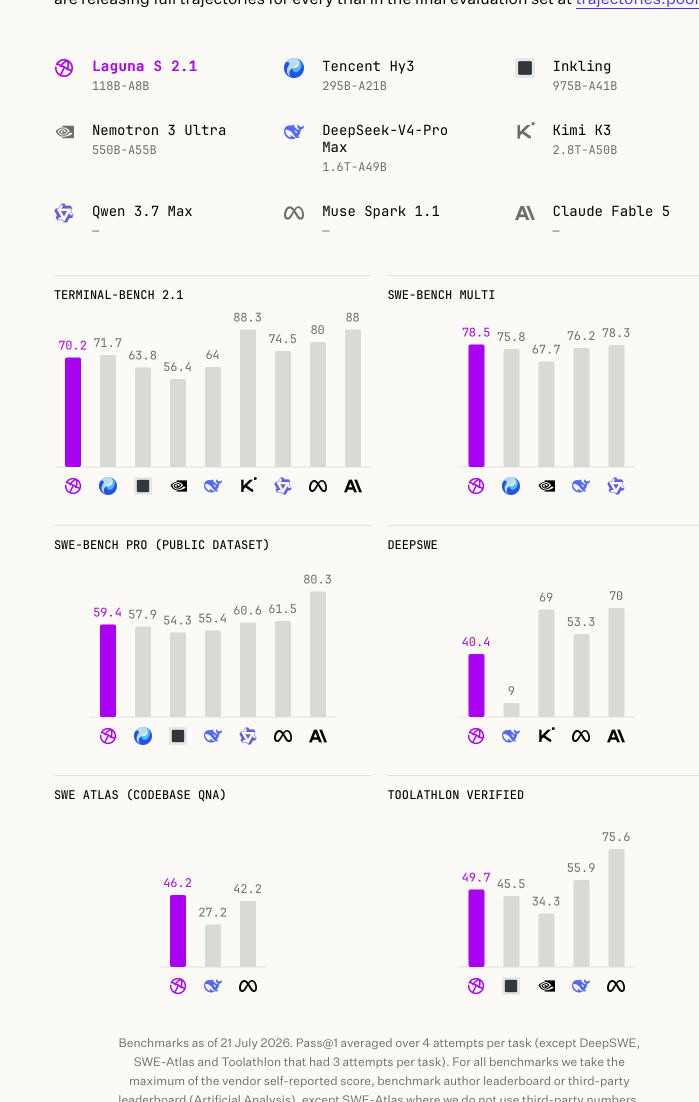
| Model | Size | Terminal-Bench 2.1 | SWE-bench Multilingual | SWE-Bench Pro (Public Dataset) | DeepSWE | SWE Atlas (Codebase QnA) | Toolathlon Verified |
|---|---|---|---|---|---|---|---|
| Laguna S 2.1 | 118B-A8B | 70.2% | 78.5% | 59.4% | 40.4% | 46.2% | 49.7% |
| Tencent Hy3 | 295B-A21B | 71.7% | 75.8% | 57.9% | - | - | - |
| Inkling | 975B-A41B | 63.8% | - | 54.3% | - | - | 45.5%* |
| Nemotron 3 Ultra | 550B-A55B | 56.4% | 67.7% | - | - | - | 34.3%* |
| DeepSeek-V4-Pro Max | 1.6T-A49B | 64.0%* | 76.2% | 55.4% | 9.0%* | 27.2%* | 55.9%* |
| Kimi K3 | 2800B-A50B | 88.3% | - | - | 69% | - | - |
| Qwen 3.7 Max | - | 74.5%* | 78.3% | 60.6% | - | - | - |
| Muse Spark 1.1 | - | 80% | - | 61.5% | 53.3% | 42.2%* | 75.6% |
| Claude Fable 5 | - | 88% | - | 80.3% | 70% | - | - |
Benchmarks as of 21 July 2026. Laguna S 2.1 in bold; a dash (-) marks a benchmark a model was not evaluated on. Scores marked * are as reported by third parties: Terminal-Bench 2.1 and DeepSWE via Artificial Analysis, SWE Atlas via Scale AI's official leaderboard, and Toolathlon Verified via its official leaderboard. Full evaluation trajectories: trajectories.poolside.ai.
Usage
Laguna S 2.1 uses the same laguna architecture as Laguna XS 2.1, so the same
engine integrations apply (vLLM, SGLang, Transformers, TRT-LLM, llama.cpp). At 118B
parameters the BF16 checkpoint needs multiple GPUs (roughly 236GB of weights);
quantized variants reduce this substantially.
vLLM
vllm serve \
--model poolside/Laguna-S-2.1 \
--tensor-parallel-size 4 \
--tool-call-parser poolside_v1 \
--reasoning-parser poolside_v1 \
--enable-auto-tool-choice \
--served-model-name laguna \
--default-chat-template-kwargs '{"enable_thinking": true}'
Optional: speculative decoding with DFlash. Pair with the Laguna S 2.1 DFlash draft model by adding
--speculative-config '{"model":"poolside/Laguna-S-2.1-DFlash","num_speculative_tokens":7,"method":"dflash"}'.
Controlling reasoning
Laguna S 2.1 has native reasoning support and works best with preserved thinking:
keep reasoning_content from prior assistant messages in the message history.
The model will generally reason before calling tools and between tool calls, and
may stop reasoning in follow-up steps if prior thinking blocks are dropped.
Thinking is controlled per request via the chat template:
extra_body={"chat_template_kwargs": {"enable_thinking": False}}
or at the server level with
--default-chat-template-kwargs '{"enable_thinking": true}'. For agentic coding
use cases we recommend enabling thinking and preserving reasoning in the message
history.
License
This model is licensed under the OpenMDW-1.1 License.
Intended and Responsible Use
Laguna S 2.1 is designed for software engineering and agentic coding use cases, and you are responsible for confirming that it is appropriate for your intended application. Laguna S 2.1 is subject to the OpenMDW-1.1 License, and should be used consistently with Poolside's Acceptable Use Policy. We advise against circumventing Laguna S 2.1 safety guardrails without implementing substantially equivalent mitigations appropriate for your use case.
Please report security vulnerabilities or safety concerns to security@poolside.ai.
- Downloads last month
- 2,119
2-bit
3-bit
Model tree for TobDeBer/Laguna-S-2.1-GGUF
Base model
poolside/Laguna-S-2.1